The JobTabs Job Search & Resume Builder word processor is shared between the resume editor and the cover letter editor. Each of the sub topics below provides an explanation of the menus and corresponding toolbars in the word processor. Functionality that needs to be elaborated on will be shown as a sub-topic below. These instructions are provided separately only because they could generally be attributed to any word processor. Any functionality that is specifically designed for cover letters, resumes or JobTabs will be stated as such.

Resume and Cover Letter Toolbar
|
Close |
Ends the editing operation. If there are unsaved changes you will be prompted to save them. |
 |
Saves editing changes. |
 |
Cuts the currently selected text or picture to the clipboard. |
 |
Copies the currently selected text or picture to the clipboard. |
 |
Pastes the contents of the clipboard to the document. |
 |
Add or edit a hyperlink. |
 |
Toggle between header and footer. This facility is only enabled when you are editing your resume in Page Layout mode. Normal mode and Page Layout mode can be toggled via the View menu. |
 |
Go to the header and footer on the first page. Enabled when you are editing your resume in Page Layout mode. |
 |
Go to the header and footer on the subsequent pages. Enabled when you are editing your resume in Page Layout mode. |
 |
Apply formatting to a paragraph. |
 |
Do a spell check. |
 |
Open the thesaurus for currently highlighted word. |
Formatting Toolbar
 |
Apply formatting to characters. This dialog encapsulates all of the functionality of many of the formatting options on this toolbar. |
|
|
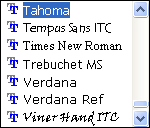
Change the active font. |
|
|
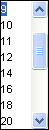
Change the font size. |
 |
Bold |
 |
Italics |
 |
Underline |
 |
Strikethru |
 |
Justify left |
 |
Justify center |
 |
Justify right |
 |
Justify full |
 |
Numbering |
 |
Bullets |
 |
Indent out |
 |
Indent in |
 |
Text background color |
 |
Text color |


Contents of the Font Combo Boxes
|
|
|
© 2005 - 2012 by JobTabs, LLC. All rights reserved.